The FlowTimebaseDB TagProvider allow dynamic retrieval of data from TimebaseDB Historian Datasets of Flow Software, as well to save tags values to the TimebaseDB Historian Datasets. It can be used in read-only mode mode, or updating values, using as an Unified Namespace TagProvider.
Configuration
To set up a new TagProvider connection navigate to Unified Namespace/TagProvider Connections and press the add button to open the New TagProvider Connection dialog. You can also create your TagProvider Connection directly from the AssetTree. To do this, navigate to Unified Namespace/Assets Tree and press  to open the New TagProvider Connection dialog. In the configuration dialog, select the FlowTimebaseDB Database Connector on the Provider field and insert the required connection parameters. After that, press the Ok button to finish the provider configuration, and it will create a folder automatically in the Assets Tree (Unified Namespace / Assets Tree).
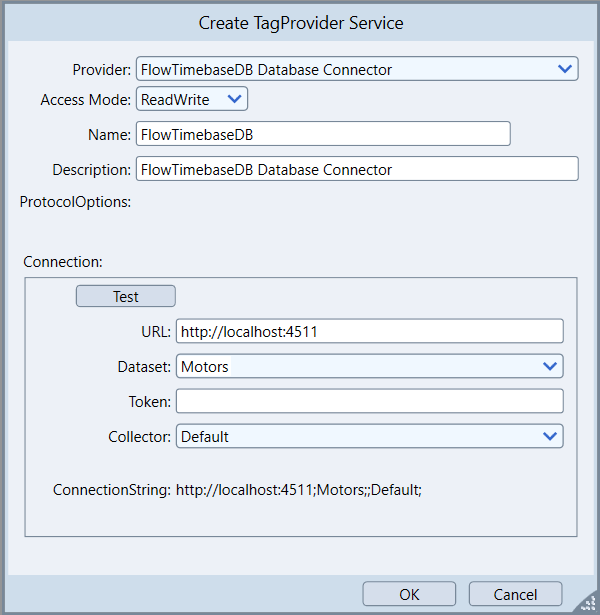
Connection Parameters
Field | Description |
|---|---|
Provider | Specifies the system the TagProvider will interface with. In this case, it interfaces with the FlowTimebaseDB Database Connector. |
Access Mode | Determines permissions for interacting with tags. Read allows only data reading. Write permits only data writing. ReadWrite enables both reading and writing. |
Name | User-defined name for the TagProvider instance. Identifies the specific configuration in the system. |
Description | Defines a short description for the TagProvider's purpose or the systems it interfaces with. Provides context for its usage. |
ProtocolOptions | Defines specific communication settings for the connection to the device. |
Connection | Defines connection settings for the FlowTimebaseDB, including IP address, port, token, bucket, and organization. |
URL | Specifies the URL with port of the FlowTimebaseDB server. |
Dataset | Defines the Dataset within FlowTimebaseDB to retrieve or store data. |
Token | Specifies the token for authentication with the FlowTimebaseDB server. |
Collector | Specifies the type of Collector to be used. Each one have a specific behavior in Runtime. |
ConnectionString | Displays the full connection string used to connect to the FlowTimebaseDB server. Provides a summary of all connection parameters. |
- Collector: Specifies the type of Collector to be used. Each one have a specific behavior in Runtime. Options are:
- Default: Connects to any FlowTimebaseDB Database without any custom TreeView is based only on Filter configuration.
- SolutionHistorian: Is used to Write ProjectTags Historian data in a custom.
- Filters field will always be disabled, with measurement and field columns added to.
- When Provider is used as Historian, Historian TableName will be used as measurement.
- TreeView structure will behave different than Default and MQTT More details available in following sections.
- MQTT: Is used to Read Data that was stored using Telegraf’s MQTT Plugin pre-defined column structure.
- The Topic information MUST be stored in a column named topic.
- Filters field will always be disabled, with measurement, topic and field columns added to
- TreeView structure will behave different than Default and tProj Historian. More details available in following sections.
When using the FlowTimebaseDB in conjunction with Unified Namespace TagProvider, the Collector Default and MQTT can be used. |
TagProvider connections cannot create new CustomColumns in FlowTimebaseDB Database, only access existing ones. To create new CustomColumns, use the Device Module Configuration. |
Address Parameters
Field | Description |
|---|---|
Measurement | Specifies the prefix used to save or read the Tag value in the FlowTimebaseDB. If blank, the prefix set will be "Tag". |
Tag | Specifies the identifier used when saving or retrieving the tag value. If left blank, the tag's own name will be used as the default. |
Use Template As Custom Fields | Adds the template used as a custom field. |
Additional Custom Fields | Specifies the "Fields" column in Timebase Historian. Usage would be: "Fields=myField". |
Description, Unit of Measure, Format, and Type are configured and retrieved from the Tag settings in Unified Namespaces / Tags. |
Collectors
Default Collector
This collector will access any FlowTimebaseDB Database, and create the TreeView Structure based on the Filters.
This Collector can Read/Write data, and it is used with the Unified Namespace TagProviders.
MQTT Collector
This Collector is used to Read Data from an FlowTimebaseDB Database Structure that was stored using Telegraf’s MQTT Plugin pre-defined schema, with MQTT topic stored in a column called topic.
The filters are, by default, defined as _measurement, topic and _field.
In Runtime, the TreeView Structure will use the MQTT Topic similar to what is done in MQTTspB ExternalTags.
As an example, let us assume we have an MQTT Client publishing to Topics:
|
The _measurement is defined as mqtt_consumer and _field is value.
Reading Historical Data
By using the Complete TagName as _field, the TreeView can use that information to transform that name into a multi-level structure.