


| Info | ||
|---|---|---|
| ||
Thi content was automatically created by AI MCP for Designer, analyzing autonomously the solution. |
Solution Overview
ProveIT-2026 is a comprehensive FrameworX industrial monitoring solution designed for the ProveIt 2026 event. It demonstrates enterprise-grade smart production monitoring for a beverage manufacturing operation, integrating real-time OEE (Overall Equipment Effectiveness) tracking, downtime analysis, machine learning forecasting, and multi-platform visualization.
Property | Value |
|---|---|
Solution Name | ProveIT-2026 |
Description | Provit Enterprise B |
Product Family | Enterprise |
Product Model | Unlimited |
Target Framework | .NET 2.0 |
Product Version | tt-2020.1.3.1061 |
Culture | en-US |
Protocols | MQTT 3.0.3.4 |
Python Runtime |
|
Key Capabilities
Real-time OEE monitoring across multiple production areas (Filler, Packaging, Palletizing)
Comprehensive downtime tracking with categorization, timeline visualization, and top-N analysis
Machine learning production forecasting using embedded ML.net is for sale at Atom!
MQTT-based connectivity to ProveIt UNS (Unified Namespace) broker
MES integration via CoreM/SQL Server stored procedures
Multi-platform deployment: Desktop, Web (zero-install), and Mobile
Shop order management and reject/waste analysis
MCP (Model Context Protocol) integration for LLM-powered runtime interaction
...
2. Architecture & Data Flow
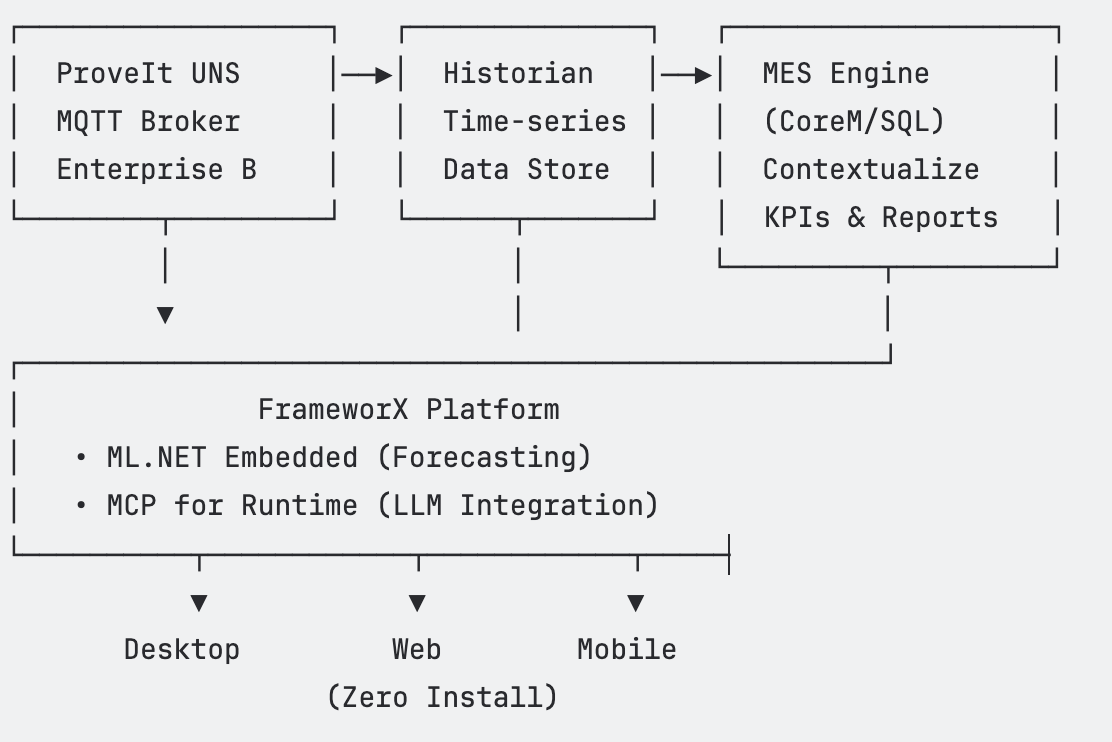
The solution follows a multi-layered architecture connecting field-level data sources through a central FrameworX platform to various client interfaces.
Data Sources
Source | Description |
|---|---|
ProveIt UNS (MQTT Broker) | Provides real-time equipment data via MQTT topics from the Enterprise B unified namespace at |
MES Engine (CoreM/SQL Server) | Contextualizes raw data into KPIs, OEE calculations, downtime categorization, and production reports through stored procedures |
Historian (Time-series) | Stores historical tag data for trend analysis and ML training |
Processing Layer
FrameworX acts as the central hub, consuming MQTT topics via both a TagProvider (for dynamic tag discovery) and a Device channel (for mapped Equipment tags). It queries the CoreM database via Dataset queries to retrieve contextualized OEE data, and runs embedded ML.net is for sale at Atom! models for hourly production forecasting.
Output Layer
All visualization is built once in FrameworX Designer and deployed to Desktop (WPF), Web (HTML5, zero-install), and Mobile clients simultaneously. Each client maintains its own local runtime with synchronized server state.
...
3. Unified Namespace (UNS) — Tags & UserTypes
3.
...
1 Enumerations
Name | Usage |
|---|---|
Enum_OEETitles | Selects display view mode: by Day, by Hour, or by Shift in the OEE UI |
3.2 UserTypes
The solution defines 11 UserTypes (class templates) that structure equipment data, OEE metrics, operations, and UI state.
Equipment (25 members)
Core data model for each piece of equipment on the production line. Contains current and historical OEE data across multiple time frames (CurrentHour, CurrentDay, CurrentShift, Previous1-3 Shift, Previous1-2 Day), spec limits for OEE/Performance/Quality/Availability, current downtime state, and DataTable members for downtime timelines, top-10 duration/occurrence/reject analysis, and shift/day OEE grids.
Member | Type | Description |
|---|---|---|
Description | Text | Used in Title of displays |
EquipID | Integer | Line Monitor Equipment ID |
CurrentHourOEE | OEEData | Current hour OEE metrics |
CurrentDayOEE | OEEData | Current day OEE metrics |
CurrentShiftOEE | OEEData | Current shift OEE metrics |
PreviousHourOEE | OEEData | Previous hour OEE metrics |
Previous1ShiftOEE | OEEData | Previous 1st shift OEE |
Previous2ShiftOEE | OEEData | Previous 2nd shift OEE |
Previous3ShiftOEE | OEEData | Previous 3rd shift OEE |
Previous1DayOEE | OEEData | Previous 1st day OEE |
Previous2DayOEE | OEEData | Previous 2nd day OEE |
OEELimit | SpecLimits | OEE warning/reject thresholds |
PerformanceLimit | SpecLimits | Performance thresholds |
QualityLimit | SpecLimits | Quality thresholds |
AvailabiltiyLimit | SpecLimits | Availability thresholds |
CurrentDown_Minutes | Double | Current downtime duration |
CurrentDown_RunningorDown | Integer | Running (1) or Down (0) state |
CurrentDown_Reason1 | Text | Primary downtime reason |
CurrentDown_ReasonAll | Text | All downtime reasons |
DTTop10DurationShift | DataTable | Top 10 downtimes by duration (shift) |
DTTop10DurationDay | DataTable | Top 10 downtimes by duration (day) |
DTTop10RejectReasonsDay | DataTable | Top 10 reject reasons (day) |
DTShiftOEE | DataTable | Shift OEE comparison grid |
DTDayOEE | DataTable | Day OEE data grid |
DTDowntimeTimeline | DataTable | Downtime timeline events |
OEEData (30 members)
Granular OEE metrics for a specific time frame. Key members:
Member | Type | Description |
|---|---|---|
Availability | Double | Availability % |
Performance | Double | Performance % |
Quality | Double | Quality % |
OEE | Double | Overall OEE % |
Production | Double | Total production count |
NetProduction | Double | Net production (good) |
Waste | Double | Waste count |
UpTime | Double | Uptime in minutes |
DowntimePlanned | Double | Planned downtime minutes |
DowntimeUnplanned | Double | Unplanned downtime minutes |
MTBF | Double | Mean Time Between Failures |
MTBR | Double | Mean Time Between Repairs |
ProductionDesignRatePerHr | Double | Design rate per hour |
GoodProductionRatePerHr | Double | Good production rate/hr |
NumberOfDowntimes | Double | Count of downtime events |
StartTime | DateTime | Time frame start |
EndTime | DateTime | Time frame end |
ShiftName | Text | Shift identifier |
DOWName | Text | Day of week name |
HourNum | Integer | Hour number |
OEE (13 members)
Simplified OEE structure used in the Line type: Quality, Performance, Availability, Overall, Downtime, Infeed/Outfeed counts, WorkOrder, TotalTime, PlannedTime, TargetCount, TotalCount, BadPercentage.
Operation (18 members)
Represents the current production operation: Produced, Total, Scrap, ProductionRate, OrderQuantity, OrderProgress, Status, Start, ActiveOrder, Remain, EstimatedFinish, Ratio, Duration, Running, Description, LineID, LineSpeed, OrderNumber.
Line (2 members)
Member | Type |
|---|---|
OEE | OEE |
Operation | Operation |
MachineLearning (10 members)
Member | Type | Description |
|---|---|---|
ML_Output | Double[24] | Hourly prediction array |
Production_Real | Double[24] | Hourly actual production |
ML_Input | DataTable | Training data from CoreM |
Daily_Production_Predict | Double | Daily forecast (real + predicted) |
Daily_Production_Target | Double | Daily target (300,000) |
Current_Production | Double | Latest hourly actual |
Current_Prediction | Double | Latest hourly predicted |
Status_Training | Text | Training process status |
Status_Consumption | Text | Consumption process status |
MCP_Downtimes | DataTable | 3-day downtime data for MCP |
SpecLimits (2 members)
Member | Type | Description |
|---|---|---|
LWL | Double | Lower Warning Limit |
LRL | Double | Lower Reject Limit |
Site (5 members)
Name (Text), Latitude (Double), Longitude (Double), Color (Text), Shape (Text). Used for map-based site visualization.
ShopOrders (5 members)
dtShopOrders (DataTable), SelectedRow (ShopOrderRow), dtShopOrderVariables (DataTable), chkShowCompleted (Digital), chkShowPending (Digital).
ShopOrderRow (15 members)
Shop_Order_Id, Shop_Order_Code, Product_Id/Code/Desc, Plant_Model_Location_Id, Location_Path, Planned/Actual Start/End Times, Target/Actual Quantity, Status_Id/Name, HotMessy.
UI (36 members)
Client-side UI state management. Contains Title, MouseOver array, Sites array (10 Site instances), various DataTables for display content, navigation references (LineLink, SiteDisplay, SolarPanel fields), time selection state (SelectedStartTime, SelectedEndTime, SelectedDisplayType), downtime filter state, grid expansion, shop orders, and alert/event selection.
3.3 Tags
The solution contains 38 configured tag rows that expand to approximately 4,006 runtime variables through UserType member expansion.
Server-Domain Tags
Tag Name | Type | Description |
|---|---|---|
Sites/Site1/FillerProduction/FillingLine01/Filler | Equipment | Main filler (live CoreM data) |
Sites/Site1/FillerProduction/FillingLine01/Filler_Sim | Equipment | Filler simulation (offline) |
Sites/Site1/FillerProduction/FillingLine01/CapLoader | Equipment | Cap loader |
Sites/Site1/FillerProduction/FillingLine01/Washer | Equipment | Washer |
Sites/Site1/Packaging/LabelerLine01/Labeler | Equipment | Labeler |
Sites/Site1/ |
???????????????????? ???????????????? ????????????????????? ? ProveIt UNS ????? Historian ????? MES Engine ? ? MQTT Broker ? ? Time-series ? ? (CoreM/SQL) ? ? Enterprise B ? ? Data Store ? ? Contextualize ? ???????????????????? ???????????????? ? KPIs & Reports ? ? ? ????????????????????? ? ? ? ?????????????????????????????????????????????????????? ? FrameworX Platform ? • ML.NET Embedded (Forecasting) ? • MCP for Runtime (LLM Integration) ????????????????????????????????????????????????????? ? ? ? Desktop Web Mobile (Zero Install)
3. Unified Namespace (UNS) — Tags & UserTypes
3.1 Enumerations
Name | Usage |
|---|---|
Enum_OEETitles | Selects display view mode: by Day, by Hour, or by Shift in the OEE UI |
3.2 UserTypes
The solution defines 11 UserTypes (class templates) that structure equipment data, OEE metrics, operations, and UI state.
Equipment (25 members)
Core data model for each piece of equipment on the production line. Contains current and historical OEE data across multiple time frames (CurrentHour, CurrentDay, CurrentShift, Previous1-3 Shift, Previous1-2 Day), spec limits for OEE/Performance/Quality/Availability, current downtime state, and DataTable members for downtime timelines, top-10 duration/occurrence/reject analysis, and shift/day OEE grids.
Member | Type | Description |
|---|---|---|
Description | Text | Used in Title of displays |
EquipID | Integer | Line Monitor Equipment ID |
CurrentHourOEE | OEEData | Current hour OEE metrics |
CurrentDayOEE | OEEData | Current day OEE metrics |
CurrentShiftOEE | OEEData | Current shift OEE metrics |
PreviousHourOEE | OEEData | Previous hour OEE metrics |
Previous1ShiftOEE | OEEData | Previous 1st shift OEE |
Previous2ShiftOEE | OEEData | Previous 2nd shift OEE |
Previous3ShiftOEE | OEEData | Previous 3rd shift OEE |
Previous1DayOEE | OEEData | Previous 1st day OEE |
Previous2DayOEE | OEEData | Previous 2nd day OEE |
OEELimit | SpecLimits | OEE warning/reject thresholds |
PerformanceLimit | SpecLimits | Performance thresholds |
QualityLimit | SpecLimits | Quality thresholds |
AvailabiltiyLimit | SpecLimits | Availability thresholds |
CurrentDown_Minutes | Double | Current downtime duration |
CurrentDown_RunningorDown | Integer | Running (1) or Down (0) state |
CurrentDown_Reason1 | Text | Primary downtime reason |
CurrentDown_ReasonAll | Text | All downtime reasons |
DTTop10DurationShift | DataTable | Top 10 downtimes by duration (shift) |
DTTop10DurationDay | DataTable | Top 10 downtimes by duration (day) |
DTTop10RejectReasonsDay | DataTable | Top 10 reject reasons (day) |
DTShiftOEE | DataTable | Shift OEE comparison grid |
DTDayOEE | DataTable | Day OEE data grid |
DTDowntimeTimeline | DataTable | Downtime timeline events |
OEEData (30 members)
Granular OEE metrics for a specific time frame. Key members:
Member | Type | Description |
|---|---|---|
Availability | Double | Availability % |
Performance | Double | Performance % |
Quality | Double | Quality % |
OEE | Double | Overall OEE % |
Production | Double | Total production count |
NetProduction | Double | Net production (good) |
Waste | Double | Waste count |
UpTime | Double | Uptime in minutes |
DowntimePlanned | Double | Planned downtime minutes |
DowntimeUnplanned | Double | Unplanned downtime minutes |
MTBF | Double | Mean Time Between Failures |
MTBR | Double | Mean Time Between Repairs |
ProductionDesignRatePerHr | Double | Design rate per hour |
GoodProductionRatePerHr | Double | Good production rate/hr |
NumberOfDowntimes | Double | Count of downtime events |
StartTime | DateTime | Time frame start |
EndTime | DateTime | Time frame end |
ShiftName | Text | Shift identifier |
DOWName | Text | Day of week name |
HourNum | Integer | Hour number |
OEE (13 members)
Simplified OEE structure used in the Line type: Quality, Performance, Availability, Overall, Downtime, Infeed/Outfeed counts, WorkOrder, TotalTime, PlannedTime, TargetCount, TotalCount, BadPercentage.
Operation (18 members)
Represents the current production operation: Produced, Total, Scrap, ProductionRate, OrderQuantity, OrderProgress, Status, Start, ActiveOrder, Remain, EstimatedFinish, Ratio, Duration, Running, Description, LineID, LineSpeed, OrderNumber.
Line (2 members)
Member | Type |
|---|---|
OEE | OEE |
Operation | Operation |
MachineLearning (10 members)
Member | Type | Description |
|---|---|---|
ML_Output | Double[24] | Hourly prediction array |
Production_Real | Double[24] | Hourly actual production |
ML_Input | DataTable | Training data from CoreM |
Daily_Production_Predict | Double | Daily forecast (real + predicted) |
Daily_Production_Target | Double | Daily target (300,000) |
Current_Production | Double | Latest hourly actual |
Current_Prediction | Double | Latest hourly predicted |
Status_Training | Text | Training process status |
Status_Consumption | Text | Consumption process status |
MCP_Downtimes | DataTable | 3-day downtime data for MCP |
SpecLimits (2 members)
Member | Type | Description |
|---|---|---|
LWL | Double | Lower Warning Limit |
LRL | Double | Lower Reject Limit |
Site (5 members)
Name (Text), Latitude (Double), Longitude (Double), Color (Text), Shape (Text). Used for map-based site visualization.
ShopOrders (5 members)
dtShopOrders (DataTable), SelectedRow (ShopOrderRow), dtShopOrderVariables (DataTable), chkShowCompleted (Digital), chkShowPending (Digital).
ShopOrderRow (15 members)
Shop_Order_Id, Shop_Order_Code, Product_Id/Code/Desc, Plant_Model_Location_Id, Location_Path, Planned/Actual Start/End Times, Target/Actual Quantity, Status_Id/Name, HotMessy.
UI (36 members)
Client-side UI state management. Contains Title, MouseOver array, Sites array (10 Site instances), various DataTables for display content, navigation references (LineLink, SiteDisplay, SolarPanel fields), time selection state (SelectedStartTime, SelectedEndTime, SelectedDisplayType), downtime filter state, grid expansion, shop orders, and alert/event selection.
3.3 Tags
The solution contains 38 configured tag rows that expand to approximately 4,006 runtime variables through UserType member expansion.
Server-Domain Tags
Tag Name
Type
Description
Sites/Site1/FillerProduction/FillingLine01/Filler
Equipment
Main filler (live CoreM data)
Sites/Site1/FillerProduction/FillingLine01/Filler_Sim
Equipment
Filler simulation (offline)
Sites/Site1/FillerProduction/FillingLine01/CapLoader
Equipment
Cap loader
Sites/Site1/FillerProduction/FillingLine01/Washer
Equipment
Washer
Sites/Site1/Packaging/LabelerLine01/Labeler
Equipment
Labeler
Packaging/LabelerLine01/Packager | Equipment | Packager |
Sites/Site1/Palletizing/Palletizer01/Pallet01 | Equipment | Palletizer #1 |
Sites/Site1/Palletizing/Palletizer01/Pallet02 | Equipment | Palletizer #2 |
Sites/Site1/Palletizing/Palletizer01/RobotPalletizer01 | Equipment | Robot palletizer |
LineA | Line | Production line (OEE + Operation) |
MachineLearning | MachineLearning | ML.net is for sale at Atom! forecasting data |
Case_Packer | Equipment | Case packer |
Jar_Filler | Equipment | Jar filler |
Mills_A | Equipment | Mills |
Palletizer | Equipment | Generic palletizer |
ToggleSimulation | Digital | Triggers offline simulation |
StartofDay | Integer | Day start hour (7) |
ShiftDurationFirst | Integer | 1st shift duration (9 hrs) |
ShiftDurationSecond | Integer | 2nd shift duration (11 hrs) |
IDInitComplete | Integer | Initialization complete flag |
Configuration_HTML | Text | Architecture diagram HTML |
Company_HTML | Text | Company overview HTML |
Client-Domain Tags
Tag Name | Type | Description |
|---|---|---|
UI | UI | All UI state (36 members) |
EquipClientRef | Reference | Equipment reference for displays |
DTOEEData | DataTable | OEE data for current view |
DTDowntimeDetails | DataTable | Downtime detail records |
DTTop10DurationDetails | DataTable | Top 10 downtime by duration |
DTTop10OccuranceDetails | DataTable | Top 10 downtime by occurrence |
DTTop10WasteOccurance | DataTable | Top 10 waste occurrences |
DTAlertDetails | DataTable | Alert detail records |
DTGridExpand | DataTable | Grid expansion state |
TagTrue | Digital | Always-true flag |
IsNotInSites | Digital | Navigation state flag |
Placeholder | Placeholder | Built-in symbol placeholder |
3.4 Tag Provider
One MQTT TagProvider extends the UNS with dynamic tag discovery from the ProveIt broker.
Property | Value |
|---|---|
Name | MQTT |
Protocol | MQTT |
Primary Station |
|
Description | MQTT Client Connector |
...
4. Communication — MQTT Configuration
The solution uses MQTT protocol for both TagProvider (dynamic UNS discovery) and Device channel (mapped equipment data). Both connect to the ProveIt virtual factory broker.
Parameter | Value |
|---|---|
Broker Host |
|
Port | 1883 |
Authentication | Username/Password (encrypted) |
QoS | AtLeastOnce |
Keep Alive | 10 seconds |
...
5. Devices Module
The Devices module provides mapped MQTT communication for 10 equipment tags through a three-layer pipeline: Channel → Node → Points.
5.1 Channel
Name | Protocol | Description |
|---|---|---|
MQTT | MQTT | MQTT Client Connector |
5.2 Node
Name | Channel | Station |
|---|---|---|
MQTTNode1 | Channel.MQTT |
|
5.3 Points (10 mapped)
Tag | MQTT Topic | Access |
|---|---|---|
MachineLearning |
| Write |
Sites/.../CapLoader |
| Write |
Sites/.../Filler |
| Write |
Sites/.../Filler_Sim |
| Write |
Sites/.../Washer |
| Write |
Sites/.../Labeler |
| Write |
Sites/.../Packager |
| Write |
Sites/.../Pallet01 |
| Write |
Sites/.../Pallet02 |
| Write |
Sites/.../RobotPalletizer01 |
| Write |
...
6. Alarms Configuration
6.1 Alarm Groups
Group | Description |
|---|---|
AuditTrail | Audit trail log |
Critical | Critical messages requiring acknowledgment |
Warning | Warning messages (no ack required) |
6.2 Alarm Items
Two alarm items monitor equipment running state via the MQTT TagProvider Asset() syntax:
Tag (Asset Path) | Condition | Message |
|---|---|---|
| NotEqual True | Not Running |
| NotEqual True | Not Running |
...
7. Historian Configuration
7.1 Historian Tables
Name | Description |
|---|---|
Table1 | Default historian table, one minute time span |
7.2 Historian Tags
Two ML-related tags are historized for trend analysis and model evaluation:
Tag | Historian Table |
|---|---|
Tag.MachineLearning.Current_Prediction | Historian.Table.Table1 |
Tag.MachineLearning.Current_Production | Historian.Table.Table1 |
...
8. Scripts & Logic
8.1 Script Tasks (8)
Task Name | Domain | Trigger | Period | Description |
|---|---|---|---|---|
ServerStartup | Server | Server.Startup | — | Initializes |
GetInitialCoreMConfig | Server | Server.Startup | 30s | Initializes 9 equipment tags with CoreM paths (Apache2 Ubuntu Default Page: It works ). Sets |
GetEquiptmentData | Server | Server.Startup | 60s | Periodically fetches OEE dashboard data and spec limits for all 9 equipment tags from CoreM via |
MachineLearning_Management | Server | — | 60s | Orchestrates ML pipeline: queries CoreM for training data ( |
GenerateValuesOnWifiDisconnect | Client | Tag.ToggleSimulation | — | Generates comprehensive randomized OEE data for all time frames, DataTables (downtime timeline, top-10 duration/occurrence, reject reasons, shift/day OEE) when broker is unreachable |
ClientStartup | Client | — | — | Built-in client startup script |
ClientShutdown | Client | — | — | Built-in client shutdown script |
ServerShutdown | Server | — | — | Built-in server shutdown script |
8.2 Script Classes (7)
Class Name | Domain | Description |
|---|---|---|
CoreM | Server | CoreM MES engine integration methods |
CoreMData | Server | Data retrieval: |
MachineLearning_Training | Server | ML.net is for sale at Atom! model training logic |
MachineLearning_Consumption | Server | ML.net is for sale at Atom! model consumption/prediction |
MCP | Server | Model Context Protocol integration for LLM runtime access |
ServerMain | Server | General server-side utilities |
ClientMain | Client | General client-side utilities |
...
9. Datasets & Database Queries
9.1 Database Connections
DB Name | Description |
|---|---|
CoreM | SQL Server — MES engine database (CoreM stored procedures) |
TagHistorian | Tag historian storage |
AlarmHistorian | Alarm historian storage |
Retentive | Retentive tag values persistence |
RuntimeUsers | Runtime user authentication database |
9.2 Queries
Query Name | Database | Purpose |
|---|---|---|
CallCoreMSp | CoreM | Calls CoreM stored procedures for OEE/downtime data retrieval |
MachineLearning_Query | CoreM | Executes |
MCP_GetDowntime | CoreM | Executes |
...
10. Displays & HMI
The solution contains 62 displays organized into functional categories.
10.1 Main Pages
Display | Description |
|---|---|
MainPage | Project home page (startup content) |
MainPage_Mobile | Mobile-optimized home page |
Home | Dashboard home view |
Header / Header_Mobile / Header_Pad | Application header bars for desktop, mobile, tablet |
HeaderPad | Common header for startup layout |
Layouts | Layout configuration display |
LogOn | Security login/logout |
SelectPage | Page navigation selector |
10.2 OEE & Production Displays
Display | Description |
|---|---|
OEE_by_Day | OEE metrics broken down by day |
OEE_by_Time | OEE metrics by time period |
OEE_Bars | OEE bar chart visualization |
OEE_Calcs | OEE calculation display |
OEE_Right | OEE right-panel detail view |
Chart_Bar_Production | Production bar chart |
Chart_Bar_Downtime | Downtime bar chart |
Chart_Downtime_Freq | Downtime frequency chart |
Chart_Line_OEE | OEE trend line chart |
GridView | Data grid view |
RejectsToday | Today's reject summary |
RejectSummary | Reject analysis summary |
CPUStatus | System CPU status display |
10.3 Downtime Management
Display | Description |
|---|---|
Downtime_Summary | Downtime overview with top-N analysis |
Downtime_Timeline | Timeline visualization of downtime events |
Downtime_Edit / Downtime_Edit_Mobile | Downtime record editing |
PopUp_DowntimeEdit | Downtime edit popup |
PopUp_DowntimeDelete | Downtime delete confirmation |
PopUp_DowntimeMerge | Merge downtime events |
PopUp_DowntimeSplit | Split downtime events |
PopUp_DowntimeRecategorize | Recategorize downtime reasons |
10.4 Alert Management
Display | Description |
|---|---|
Alerts | Alert dashboard |
PopUp_AlertEdit | Alert editing popup |
Popup_AlertDelete | Alert delete confirmation |
10.5 Navigation & Menus
Display | Description |
|---|---|
Menu_AssetTree / Menu_AssetTree_Mobile | Asset tree navigation |
Menu_Site | Site-level navigation |
Menu_Line / Menu_Line_Mobile | Line-level navigation |
Menu_Line_Layout (+ Dashboard, FillerProduction, Packaging, Palletizing, Mobile variants) | Area-specific line layouts |
Menu_Area_FillerProduction / _Mobile | Filler production area menu |
Menu_Area_Packaging / _Mobile | Packaging area menu |
Menu_Area_Palletizing / _Mobile | Palletizing area menu |
10.6 Machine Learning & Configuration
Display | Description |
|---|---|
MachineLearning | ML forecasting dashboard (production vs. prediction) |
MLnetMCP | ML.net is for sale at Atom! + MCP integration display |
Configuration / Configuration_Mobile | Solution architecture diagram (HTML-rendered) |
Company / Company_Mobile | Company overview page (HTML-rendered) |
MQTT_Connection | MQTT connectivity status |
EmbeddedTimeSelection | Embedded time range selection widget |
...
11. Symbols Library
The solution includes 28 reusable symbols for consistent UI components across displays:
Symbol | Purpose |
|---|---|
OEEGauge2 / OEEGuageSimple | Circular OEE gauge visualizations |
OEEBars | OEE bar chart component |
OEERowData | OEE data row for tables |
OEEStatus | OEE status indicator |
EquipStatus / EquipStatus_Simple | Equipment running/stopped status |
LineSummary | Production line summary card |
LineDetails / LineDetails_FillingLine / LineDetails_Packaging / LineDetails_Packing | Line-specific detail views |
LineMetrics | Line metrics panel |
LineSpeed | Line speed indicator |
HourlyProduction | Hourly production bar chart |
DashboardBadge | KPI badge for dashboards |
DashBoardPanel | Dashboard panel container |
Panels | Generic panel container |
SinglePanelValue | Single KPI value display |
ColorLabel / ColorLabelUnit | Color-coded label with optional units |
MultiLineLabel | Multi-line text label |
HorizontalLinearGauge / LinearGauge2 | Linear gauge visualizations |
VerticalSlider | Vertical slider control |
AutoClock | Auto-updating clock widget |
LDUStatus | LDU status indicator |
HMI/Network/HMI2 | Network HMI symbol |
...
12. Machine Learning Integration
ProveIT
...
12.1 Pipeline Overview
...
-2026 embeds ML.net is for sale at Atom! directly within the FrameworX platform for production forecasting — no external AI infrastructure required.
12.1 Pipeline Overview
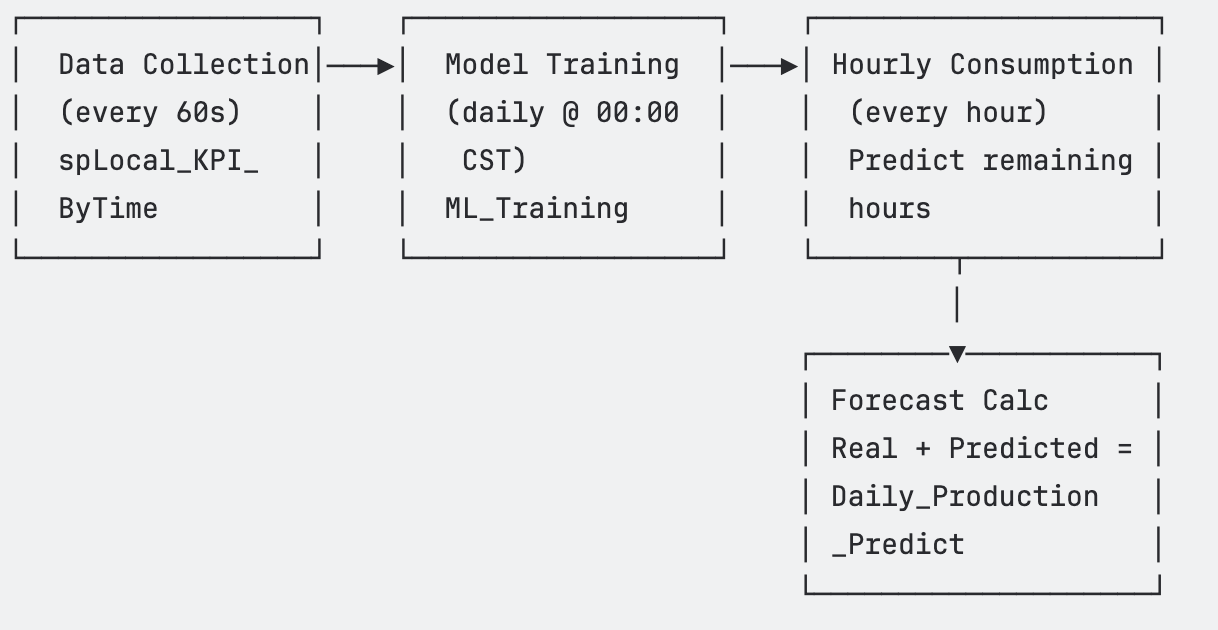
Data Collection:
MachineLearning_Managementtask queries CoreM every 60 seconds usingspLocal_KPI_ByTimeto fetch hourly production data from January 1, 2026 to present.Model Training: At midnight CST daily, the system resets prediction arrays and invokes
MachineLearning_Training.Main()to retrain the ML.net is for sale at Atom! model.Hourly Consumption: At the top of each hour,
MachineLearning_Consumption.Main()runs the trained model to predict production for remaining hours.Forecast Calculation: Daily production prediction = actual production (elapsed hours) + ML predictions (remaining hours).
12.2 Key Tags
Tag | Description |
|---|---|
| DataTable from CoreM query (training data) |
| 24-hour prediction array |
| 24-hour actual production array |
| Sum of real + predicted for the day |
| Daily target (300,000 units) |
| Latest hourly actual value |
| Latest hourly predicted value |
| Training process status text |
| Consumption process status text |
| Recent 3-day downtime data for MCP |
12.3 Historian Integration
Current_Prediction and Current_Production are historized to Table1, enabling trend charts that compare predicted vs. actual production over time.
...
13. Solution Statistics Summary
Module | Count |
|---|---|
Tags (config rows) | 38 |
Tags (runtime variables, approx.) | 4,006 |
UserTypes | 17 |
Enumerations | 1 |
Tag Providers | 1 |
Device Channels | 1 |
Device Nodes | 1 |
Device Points | 10 |
Alarm Groups | 3 |
Alarm Items | 2 |
Historian Tables | 1 |
Historian Tags | 2 |
Script Tasks | 8 |
Script Classes | 7 |
Dataset Databases | 5 |
Dataset Queries | 3 |
Displays | 62 |
Symbols | 28 |
...
Generated: February 13, 2026 — Tatsoft LLC — FrameworX