


Information on how platform features support each phase of the solution lifecycle.
Platform | Installation | Solution | Modules | Controls | Code | Troubleshooting
Overview
Solution Lifecycle (Reference): information on how FrameworX platform features support each phase of the solution lifecycle.
DevOps & Version Control isn't one component, it a series of features in various module to enable that task.
Development Workflow

Solution Development Stages
Initiate | Design | Build | Deploy | Support |
|---|---|---|---|---|
|
|
|
|
|
Two Audiences
The Solution Lifecycle has two parallel reference paths.
Engineering teams managing solution change use the DevOps and Version Control Reference. It covers Track Changes, JSON / Git export, and impact analysis — author-time concerns.
IT teams deploying and operating the product use the FrameworX Enterprise IT Readiness Reference. It covers install, identity, audit, and monitoring — operations-time concerns.
The two paths overlap on audit and compliance and cross-link there. Most readers come in via one path and visit the other only at the audit boundary.
Platform UI Components
Three Essential Workspaces
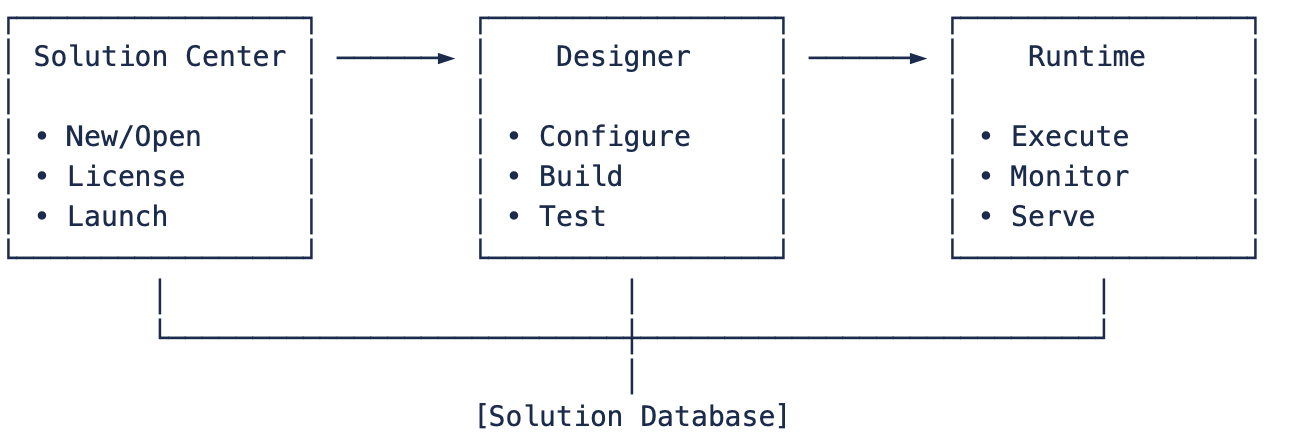
Platform Components Key Features
UI Environment | Purpose | Key Functions | |
|---|---|---|---|
Solution Center | Solution Management |
|
|
Designer | Solution Configuration |
|
|
Runtime | Solution Execution |
|
|
Platform Components Primary Use
The Solution Lifecycle uses these integrated FrameworX components:
| Component | Platform Features | Primary Use |
|---|---|---|
| Solution Center | Solution management, templates, licensing | Project creation and management |
| Designer | Configuration IDE, diagnostics, Track Changes | Development and testing |
| Runtime | Execution profiles, Build & Publish, monitoring | Validation and production |
| DevOps & Version Control | Git integration, change tracking, audit trail | Change management and deployment |
Quick Reference Tables
Development Time Estimates
| Solution Size | Tags | Development Time (*) | Team Size |
|---|---|---|---|
| Small | <1,000 | 1-2 weeks | 1 person |
| Medium | 1,000-10,000 | 4-8 weeks | 2-3 people |
| Large | 10,000-50,000 | 3-6 months | 3-5 people |
| Enterprise | >50,000 | 6-12 months | 5+ people |
(*) About the Development Time estimates
Best Practices Checklist
| DO: | DON'T: |
|---|---|
|
|
 Start with UNS design
 Start with displays
 Project Planning with Four Pillars
Requirements Template by Pillar
Map requirements to FrameworX architecture:
| Pillar | Requirements Focus | Platform Configuration |
|---|---|---|
| P1: UNS Foundation | Data points needed<br>Equipment hierarchy<br>Naming standards | Tags to create<br>Templates (UDTs) to design<br>Asset tree structure |
| P2: Process Modules | Field devices to connect<br>Alarm conditions<br>Historical data needs | Device channels & protocols<br>Alarm items & groups<br>Historian tables & retention |
| P3: Application Modules | Business logic required<br>Database integration<br>Reporting needs | Script tasks & classes<br>Dataset connections<br>Report templates |
| P4: Operator UI | User roles & screens<br>Client deployment<br>Mobile access | Display pages & navigation<br>Security configuration<br>Client types |
Stakeholder Mapping
| Stakeholder | FrameworX Interaction | Access Level |
|---|---|---|
| Operators | Runtime displays, alarm management | Client access |
| Engineers | Designer configuration, diagnostics | Engineering license |
| Managers | Dashboards, reports | View-only access |
| IT Support | Solution Center, Runtime monitoring | Admin access |
Testing with Platform Tools
UNS Integrity Verification
Verify foundation first:
- Designer Test Mode (F5)
- Validate tag structure and values
- Test templates and instances
- Verify asset tree navigation
- Property Watch
- Monitor real-time tag updates
- Check quality and timestamps
- Validate calculations
- Diagnostics Tools
- Runtime → Diagnostics for data inspection
- Cross-reference verification
- Module status monitoring
Execution Profile Testing
Test across environments using built-in profiles:
| Profile | Use | Platform Features |
|---|---|---|
| Development | Initial testing | Local databases, full diagnostics, simulation |
| Validation | System testing | Test servers, limited clients, performance monitoring |
| Production | Live operation | Production databases, redundancy, optimized logging |
Configure in Runtime → Execution Profiles
Deployment Using Platform Features
Build & Publish System
- Development Build
- Runtime → Build & Publish
- Create .dbsln for testing
- Include debug information
- Production Publish
- Create read-only .dbrun file
- Version numbering
- Release notes
- Deployment Package
- Solution file
- Execution profile
- Client configurations
Backup & Recovery
Platform features for deployment safety:
- Solution Backup: Before any deployment
- Automatic Backups: Configurable schedule
- Version History: Through Git integration
- Rollback Capability: Previous .dbrun versions
Quality Gates Checkpoints
| Gate | Platform Verification | Tool Location |
|---|---|---|
| Build Success | Solution compiles without errors | Runtime → Build & Publish |
| No Unused Objects | Clean configuration | Track Changes → Unused Objects |
| References Valid | All cross-references verified | Track Changes → Cross-Reference |
| Test Mode Pass | Runs without errors | Designer → Test Mode (F5) |
| Performance Check | Meets requirements | Runtime → System Monitor |
Change Management
Platform Change Tracking
| Change Type | Platform Tracking | Access Location |
|---|---|---|
| Configuration changes | Track Changes log | Track Changes → Recent Changes |
| User actions | Audit trail | Built into all modules |
| Version history | Git export | Solution → Export (if enabled) |
| Build versions | Build history | Runtime → Build & Publish |
Recommended Workflow
- Enable Git Integration
- Automatic JSON export
- Version control ready
- Diff-friendly format
- Use Track Changes
- Monitor all modifications
- Impact analysis before changes
- Audit trail for compliance
Best Practices Checklist
Leverage Platform Features
- Use Execution Profiles for environment management
- Enable Track Changes for audit trail
- Implement Git integration for version control
- Use Build & Publish for controlled deployments
- Monitor with built-in diagnostics
Avoid Common Pitfalls
- Skipping Test Mode validation
- Not using execution profiles
- Deploying without Build & Publish
- Ignoring Track Changes warnings
- Missing backup before deployment
Tools and Templates
FrameworX Native Tools
| Tool | Purpose | Description |
|---|---|---|
| Track Cross-Reference | Governance | See where each object is referenced across the solution. |
| Track Recent Changes | Version control | Lightweight built-in record of recent edits and authoring activity. |
| Track Unused Objects | Optimization | Identify objects that appear unused. |
| Track Version Control | Version control | Automated VersionID per module, table, and object, plus a global solution VersionID. |
| Build, backup flag | Backup / restore point | Create a backup copy of the current solution stage. |
| Publish | Lock production version | Lock solution file version (e.g. for FDA compliance). |
Recommended Third-Party Tools
| Tool | Purpose | Comments |
|---|---|---|
| JIRA / Azure DevOps | Task tracking | Critical for maintenance and ongoing product phases. |
| Git / SVN | Version control | Adds version comparison on top of the built-in FrameworX Track Changes tools. |
| Confluence | Document management | All phases. |
| Teams / Slack | Communication | All phases. |
Standard Document Templates
Companion documents to maintain alongside the solution:
- Project Charter
- Requirements Specification
- Design Document
- Test Plan
- Deployment Guide
- Training Materials
- Support Procedures
- Change Request Form
Quality Gate Reviews
Three project-management gates between development and production release:
Gate 1: Design Review
  - Requirements complete
  - Architecture approved
  - Risks identified
  - Resources available
        |
        v
Gate 2: Development Review
  - Code complete
  - Testing done
  - Documentation ready
  - Performance met
        |
        v
Gate 3: Deployment Review
  - Customer approval
  - Training complete
  - Support ready
  - Rollback plan
        |
        v
Production Release
Risk Management
Common project risks and standard mitigations:
| Risk | Probability | Impact | Mitigation |
|---|---|---|---|
| Scope Creep | High | High | Clear change-control process |
| Integration Issues | Medium | High | Early testing, vendor support |
| Performance Problems | Medium | Medium | Load testing, optimization |
| User Resistance | Medium | Medium | Training, involvement, support |
| Hardware Delays | Low | High | Early ordering, alternatives |
Workflow Optimization
Automation Opportunities
| Manual Task | Automated Solution |
|---|---|
| Tag Creation | Excel Import |
| Alarm Configuration | Template Application |
| Report Generation | Scheduled Tasks |
| Testing | Automated Scripts |
| Deployment | Scripted Installation |
| Backup | Automated Schedule |
Collaboration Patterns
| Team | Best Practices |
|---|---|
| Cross-Functional | Regular sync meetings, shared workspace |
| Remote Teams | Video calls, screen sharing, cloud tools |
| Customer Interaction | Demos, prototypes, feedback sessions |
| Vendor Coordination | Clear specifications, regular updates |
→ Modules / Solution Lifecycle → Tutorials / Solution Lifecycle Tutorials → How-to Guides / Solution Lifecycle How-to Guide → Technical Reference / Solution Lifecycle / ReferenceSolution Lifecycle Links
Explanation - to understand concepts
Tutorials - to learn by doing
How-to Guides - to accomplish specific tasks
Reference - technical details
In this section...