


Overview
This guide walks you through the complete solution lifecycle from development through production deployment. The first part orients you on the three workspaces and where the .dbsln configuration file fits. The Stage 1-5 sections below then provide a step-by-step playbook for moving a project from initial scope through long-term support.
Prerequisites:
- Understanding the Solution Lifecycle concepts
Configuration and Execution Environments
Start at Solution Center to create a new solution, or to work with an existing one.
The Three Workspaces
| Solution Center → |
|---|
|
| Designer → |
|---|
|
| Runtime |
|---|
|
↓
| Solution Configuration File |
|---|
| Database (.dbsln) |
Stage-by-Stage Implementation Guide
The five stages below describe the project-management process around solution development. Each stage has its own platform tools, deliverables, and quality gate. Move sequentially through Initiate → Design → Build → Deploy → Support; for an ongoing solution, the Update/Enhance loop runs Design → Build → Deploy iteratively while Support remains active.
Stage 1: Initiate (Planning)
Project Definition - Scope Development
Define clear boundaries and objectives:
- Project Scope Document
- Business Objectives
- ROI Targets
- Efficiency Goals
- Compliance Requirements
- Technical Requirements
- I/O Count
- User Count
- Integration Points
- Performance Targets
- Constraints
- Budget
- Timeline
- Resources
- Technology
- Success Criteria
- Acceptance Tests
- Performance Metrics
- Deliverables
- Business Objectives
Stakeholder Analysis
| Stakeholder | Role | Requirements | Concerns |
|---|---|---|---|
| Operations | End Users | Intuitive interface, reliable operation | Ease of use, training |
| Maintenance | Support Staff | Diagnostic tools, documentation | Troubleshooting, updates |
| Management | Decision Makers | Reports, KPIs, ROI | Cost, timeline, benefits |
| IT | Infrastructure | Security, integration, standards | Compliance, compatibility |
| Engineering | Technical Design | Flexibility, features, performance | Technical debt, scalability |
Requirements Gathering
Functional Requirements Checklist
- Process control requirements
- Data acquisition needs
- Alarm management requirements
- Reporting specifications
- User interface requirements
- Integration requirements
- Security requirements
- Performance requirements
Data Collection Worksheet Example
| Source: PLC-01 |
|---|
| Protocol: Modbus TCP |
IP Address: 10.0.0.10 Scan Rate: 1 second Point Count: 250 |
DataTypes: Holding Registers: 150 |
Stage 2: Design (Architecture)
System Architecture Design
Architecture Decision Matrix
| Component | Option 1 | Option 2 | Decision | Rationale |
|---|---|---|---|---|
| Deployment | Standalone | Distributed | Distributed | Multiple sites |
| Database | SQLite | SQL Server | SQL Server | Scale requirements |
| Redundancy | None | Hot-Standby | Hot-Standby | Critical process |
| Clients | Rich only | Rich + Web | Rich + Web | Remote access |
| Historian | Local | Enterprise | Enterprise | Corporate reporting |
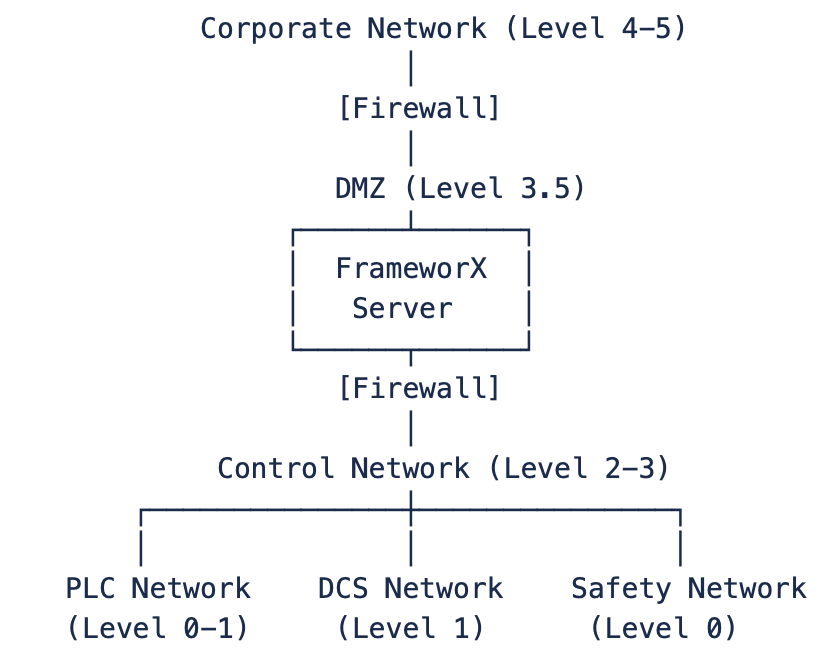
Network Architecture
Data Architecture
Tag Naming Convention
Standard: [Area]_[Equipment]_[Component]_[Signal]
Examples:
WTP_PUMP01_MOTOR_RUNNING
WTP_PUMP01_MOTOR_SPEED_SP
WTP_TANK01_LEVEL_PV
BLDG_HVAC_AHU01_TEMP_SP
WTP (Water Treatment Plant)
??? PUMP01
?   ??? MOTOR
?   ?   ??? RUNNING
?   ?   ??? SPEED_SP
?   ?   ??? SPEED_PV
?   ??? VALVE
?       ??? OPEN_CMD
?       ??? POSITION
??? TANK01
    ??? LEVEL_PV
UDT Design - UNS Data Template
UDT: Motor_VFD
Properties:
  - Name: String
  - Location: String
  - RatedHP: Float
Members:
  Commands:
    - Start_CMD: Boolean
    - Stop_CMD: Boolean
    - Speed_SP: Float (0-100%)
  Status:
    - Running: Boolean
    - Faulted: Boolean
    - Speed_PV: Float
    - Current: Float
    - Temperature: Float
  Alarms:
    - OverCurrent: Boolean
    - OverTemp: Boolean
    - CommLoss: Boolean
  Statistics:
    - RunHours: Double
    - StartCount: Integer
    - LastStartTime: DateTime
Display Architecture
Navigation Hierarchy
Main Menu
??? Overview
?   ??? Plant Overview
??? Areas
?   ??? Area 1
?   ?   ??? Process Overview
?   ?   ??? Equipment
?   ?   ??? Trends
?   ??? Area 2
?   ??? Area 3
??? Utilities
?   ??? Power Monitoring
?   ??? Compressed Air
?   ??? Steam System
??? Reports
?   ??? Production
?   ??? Quality
?   ??? Maintenance
??? Administration
    ??? Setpoints
    ??? Recipes
    ??? User Management
Stage 3: Build (Development)
Development Workflow
Sprint Planning (Example of a 2-Week Sprints)
Sprint 1: Foundation
??? Day 1–3: Create tag database
??? Day 4–6: Build UDTs
??? Day 7–9: Configure devices
??? Day 10: Testing & review

Sprint 2: Process Logic
??? Day 1–3: Alarm configuration
??? Day 4–6: Script development
??? Day 7–9: Historian setup
??? Day 10: Testing & review

Sprint 3: Visualization
??? Day 1–3: Template displays
??? Day 4–6: Process graphics
??? Day 7–9: Dashboards
??? Day 10: Testing & review

Sprint 4: Integration
??? Day 1–3: Database connections
??? Day 4–6: Reports
??? Day 7–9: External interfaces
??? Day 10: Testing & review
Configuration Management
Version Control Strategy
Repository Structure:
??? /FrameworX-Project
?   ??? /Documentation
?   ?   ??? Requirements.docx
?   ?   ??? Design.docx
?   ?   ??? UserManual.docx
?   ??? /Solution
?   ?   ??? MyProject.dbsln
?   ?   ??? /Exports
?   ?       ??? Tags_v1.0.xml
?   ?       ??? Displays_v1.0.xml
?   ??? /Scripts
?   ?   ??? Calculations.cs
?   ?   ??? Reports.sql
?   ??? /Graphics
?   ?   ??? P&ID.svg
?   ?   ??? Logos.png
?   ??? /Tests
?       ??? UnitTests.cs
?       ??? TestProcedures.xlsx
Change Management Process
Change Request ? Impact Analysis ? Approval ? Implementation ? Testing ? Deployment
       ?                 ?            ?              ?            ?          ?
   Document         Assess Risk    Get Signoff    Make Change   Validate   Release
Testing Strategy
Test Levels
| Level | Scope | Responsibility | Tools |
|---|---|---|---|
| Unit Testing | Individual components | Developer | Designer test mode |
| Integration Testing | Module interactions | Developer | Runtime test |
| System Testing | Complete solution | QA Team | Test scripts |
| Acceptance Testing | Business requirements | Customer | Test procedures |
Test Documentation - Test Case Template
Test ID: TC 001 Feature: Pump Control |
|---|
Preconditions:
|
Steps:
|
Expected Result:
|
| Actual Result: |
Stage 4: Deploy (Production)
Deployment Planning
Pre-Deployment Checklist
- All tests passed
- Documentation complete
- Backup created
- Licenses verified
- Training completed
- Support plan ready
- Rollback plan prepared
- Maintenance window scheduled
Deployment Sequence
1. Pre-Deployment (T-1 Week)
   - Final testing in staging
   - User training
   - Documentation review

2. Deployment Day (T-0)
   - 00:00 - System backup
   - 01:00 - Install software
   - 02:00 - Import configuration
   - 03:00 - Configure devices
   - 04:00 - Test communications
   - 05:00 - Verify operations
   - 06:00 - Go live

3. Post-Deployment (T+1 Day)
   - Monitor performance
   - Address issues
   - Gather feedback
Commissioning Process
System Commissioning Steps
1. Hardware Ready
2. Software & License Installation
3. Configuration load
4. I/O Checkout
5. Device Testing
6. Function Testing   ==> Loop 4, 5, 6 as needed
7. Performance Testing
8. Customer Acceptance
9. Production Release
Commissioning Documentation
| Document | Purpose | Responsibility |
|---|---|---|
| I/O List | Verify all points | Controls Engineer |
| Loop Sheets | Test each control loop | Technician |
| Alarm List | Verify alarm functions | Operations |
| Interlock Matrix | Test safety interlocks | Safety Engineer |
| Performance Log | Record system metrics | System Integrator |
Stage 5: Support (Maintenance)
Support Structure
Support Tiers
Tier 1: Operations
- Basic troubleshooting
- Restart procedures
- Known issue resolution

Tier 2: Maintenance
- Configuration changes
- Device troubleshooting
- Performance tuning

Tier 3: Engineering
- Complex problems
- System modifications
- Root cause analysis

Tier 4: Vendor
- Software bugs
- License issues
- Advanced support
Maintenance Activities
Preventive Maintenance Schedule
| Frequency | Tasks | Responsibility |
|---|---|---|
| Daily | Check system status, Review alarms, Monitor performance | Operations |
| Weekly | Backup solution, Review logs, Check disk space | Maintenance |
| Monthly | Archive data, Update documentation, Performance analysis | Engineering |
| Quarterly | Security review, Disaster recovery test, Training update | Management |
| Annually | License renewal, Major updates, System audit | All teams |
Continuous Improvement
Performance Monitoring
KPI Dashboard Example

  System Uptime:       99.8%
  Avg Response Time:   187ms
  Alarm Rate:          12/hour
  Data Loss:           0.00%
  User Satisfaction:   4.5/5

Improvement Opportunities:
- Reduce alarm rate (target: <10/hr)
- Optimize response time (<100ms)
- Increase automation (reduce manual tasks)
→ Modules / Solution Lifecycle → Tutorials / Solution Lifecycle Tutorials → How-to Guides / Solution Lifecycle How-to Guide → Technical Reference / Solution Lifecycle / ReferenceSolution Lifecycle Links
Explanation - to understand concepts
Tutorials - to learn by doing
How-to Guides - to accomplish specific tasks
Reference - technical details
In this section...