


Explains the product series and specialized distributed servers.
Platform → Overview | Architecture | Technology | Security | FrameworX | Editions
Product Series
FrameworX delivers industrial automation through three product series and specialized distributed servers, all built on a single unified platform. Every edition shares the same development environment, core technologies, and deployment flexibility.
The difference between editions lies in scale and scope, not features. Choose based on your deployment size and visualization needs, knowing you can upgrade seamlessly as requirements grow.
Product Line Alignment
Product | Role | Key Value | Typical Use |
|---|---|---|---|
Enterprise | UNS Orchestrator | Full SCADA/IIoT platform | Plant-wide control, enterprise integration |
MachineHMI | UNS Participant | Local visualization and control | Machine operation, production cell control |
EdgeConnect | UNS Originator | Edge autonomy and intelligence | Data collection, protocol conversion, edge panel HMI |
Upgrade Path: Start with EdgeConnect Gateway for data collection, add View for edge visualization, scale to MachineHMI for full machine control, or Enterprise for plant-wide operations — all with preserved investment and consistent architecture.
Product Editions Capabilities
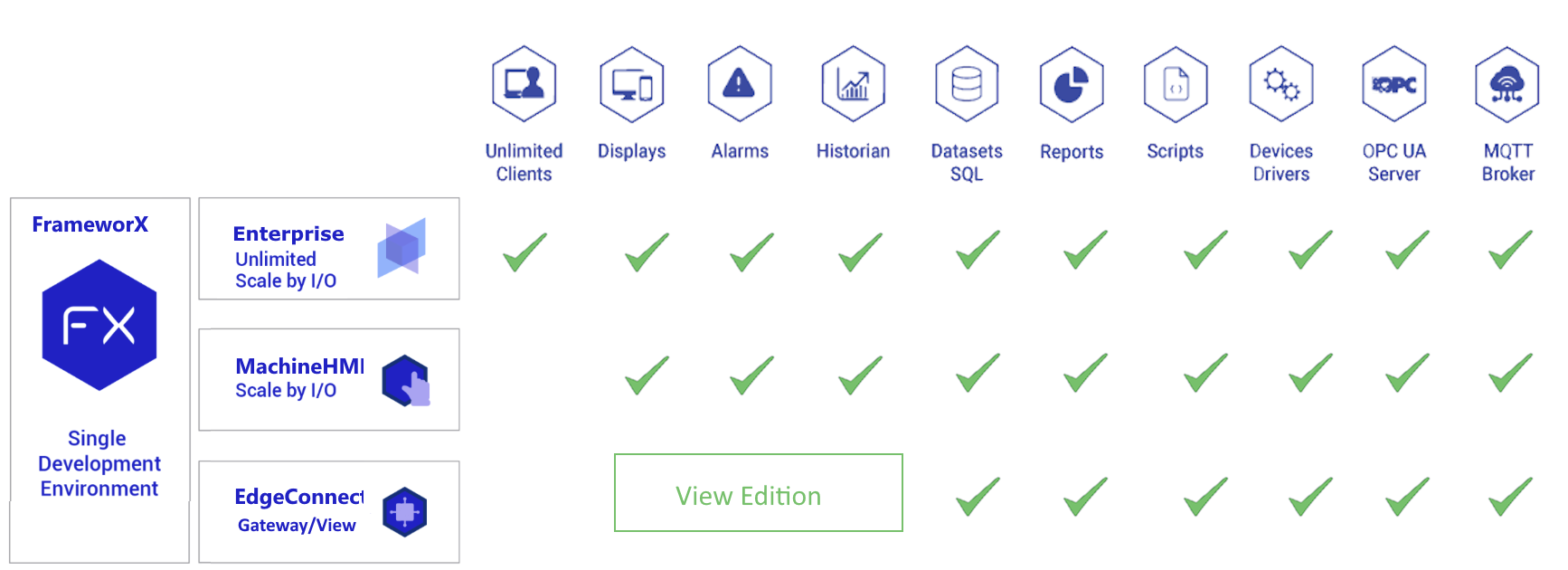
Feature / Series | Enterprise | MachineHMI | EdgeConnect Gateway | EdgeConnect View |
|---|---|---|---|---|
Local Tags | Unlimited | Unlimited | Unlimited | Unlimited |
I/O Scaling (*1) | Unlimited or 1,500 / 5,000 / 15,000 | Scaled 150 / 500 / 1,500 / 4,500 | Unlimited | Unlimited |
Scripts (C#, VB.NET, Python 3) |
|
|
|
|
SQL Datasets and Reports |
|
|
|
|
MQTT, OPC UA and 100+ connectors |
|
|
|
|
Alarms and Historian |
|
|
|
|
Display Clients |
|
|
|
|

 (*4)
(*4)(*1) I/O scaled refers to external signals bound into tags; local tags are always unlimited.
(*2) EdgeConnect Gateway: no Displays Module UI clients, only system monitor page.
(*3) Scripts run single-threaded on EdgeConnect.
(*4) EdgeConnect Gateway does not run the Alarms or Historian modules. It forwards data to a station that processes alarms and history. For full alarm and historian capability in a distributed architecture, use DataHub Station.
EdgeConnect Editions
EdgeConnect is available in two editions — choose based on whether you need a local operator interface at the edge.
EdgeConnect Gateway | EdgeConnect View | |
|---|---|---|
Role | Headless IIoT edge | Edge HMI — everything in Gateway plus displays |
Display Clients | — | 2 users (desktop and/or web) |
Alarms and Historian | — | 35-day retention |
Unlimited I/O |
|
|
100+ Connectors, MQTT Broker, OPC UA |
|
|
Scripts (.NET and Python 3) |
|
|
SQL Datasets and Reports |
|
|
Store-and-Forward |
|
|
When to use Gateway: Headless data collection, protocol conversion, IIoT bridge to central Enterprise — no screen needed.
When to use View: Remote pump stations, water utilities, distributed sites, local fallback HMI — anywhere an operator needs a screen at the edge.
When to use MachineHMI instead: Known I/O count, full alarms with unlimited retention, unlimited historian, 5+ display clients, dedicated machine scope.
FrameworX Enterprise Editions
Enterprise Unlimited | Enterprise I/O-Scaled |
|---|---|
No restrictions on tags, I/O, or clients | Cost-optimized for specific project sizes |
Distributed Systems Architecture
For advanced distributed architectures, FrameworX offers specialized server components.
DataHub Station | Displays Portal |
|---|---|
Field-Level Extension | UI-Level Extension |
Extends to remote locations or creates standalone process nodes. | Provides distributed operator interfaces, while centralizing UNS data. |
Distributed System Servers - Scope and Capabilities Matrix
DataHub Station and Displays Portal play complementary roles in distributed systems:
Feature / Server Role | DataHub Station | Displays Portal |
|---|---|---|
Local Tags | Unlimited | Unlimited |
Scripts (C#, VB.NET and Python 3) |
|
|
SQL Datasets and Reports |
|
|
Display Clients |
|
|
Alarms and Historian |
|
|
MQTT, OPC UA and 100+ connectors |
|
|
Interoperability: Both servers work with Enterprise Unlimited or can integrate with third-party SCADA systems.
Aim high. Start simple. Scale without limits.
Evaluation and Community Edition
Solutions run in Evaluation mode (4-hour runtime timeout) until an appropriate license is activated. This allows full configuration and testing before purchasing.
Register (Solution Center / License Page) to enable Community Edition: no runtime timeout for solutions up to 1000 tags and 100 communication points.
See Licensing and Activation for details.
Summary of actual Community Edition limits
| Limit | Value |
|---|---|
| Comm Points | 100 |
| Total Tags | 1000 |
| Runtime Clients | 2 |
| Engineering Users | 1 |
| Mobile Clients | 1 |
| Operation Clients | 2 |
| Displays | Unlimited |
| Duration | Perpetual |
Configuration tools are free
You can design, configure, and test solutions in any product series without a license. Production deployment requires a license matching your selected product series and edition.
if your solution with Community License goes beyond the limits, it automatically switches to Evaluation Mode.
The Community Editions is aiming for tests, educational and personal usage. For usage in production it requires adding software support & maintenance agreement.
In this section...