


Clients compatible with OPC UA specification.
- Name: OPCUA
- Version 1.1.0.1
- Protocol: OPC UA
- Interface: TCP/IP
- Runtime: Multiplatform
- Configuration:
- Devices / Protocols
Overview
OPC UA Client implements communication with local and remote OPC Servers. The communication blocks are dynamically created according to the pooling cycle defined on the Access Type for each Device Point.
OPC UA Certificate Configuration
UA security relies on X.509 Certificates. Every UA server and client application must have its own certificate containing the application’s ApplicationUri.
By default, UA servers can be configured to run with certificate validation disabled. In this mode, any valid certificate is accepted, regardless of whether it matches the application. To enable this behavior, select the Disable Security checkbox.
For OPC UA Clients, there are two ways to generate client certificates:
Default Method – Generates a certificate using default values.
Custom Method – Allows full configuration of certificate parameters.
Default Method
This certificate creation method uses pre-defined parameters for the certificate. These parameters are described below.
- Application Name: TRunModule
- Organization Name: Tatsoft
- Domain Name: Domain name for the certificate validation
- Issuer Key File: Private Key from the certificate, it is, a secret number that only the certificate holder knows (Not obligatory)
- Issuer Password: It is the Private key numbers from the Issuer Key File. (Not obligatory)
- KeySize: Rsa1024 (preselected). From FrameworX 10.1.6, you choose Rsa1024, Rsa2048 or Rsa4096.
- Hash Algorithm: Sha1 (preselected). From FrameworX 10.1.6, you choose Sha1 or Sha256.
- LifeTime: 12 Months
- Server Certificate: Add the Server Certificate
In Devices → Nodes, the user can access this feature by clicking the Default button. The certificate will automatically be saved in the /ProgramData/?ProductName?. Click the Test button to check the connection.
The Client certificate should be imported / trusted on the OPC Server side.
Changed in FrameworX 10.1.6
The Default Method lets you choose KeySize and Hash Algorithm. To connect to a server whose only security policy is Basic256Sha256, select Rsa2048 or Rsa4096 and Sha256 before you create the certificate. A Default certificate created without changing these two fields uses Rsa1024 and Sha1, the same settings as in 10.1.5. In 10.1.5, these two fields were fixed in the Default Method.
Custom Method
In Devices → Nodes, the user can access this feature by clicking the Custom button. The ClientCertificateHelper application should open. Fill the input fields and save the certificate file.
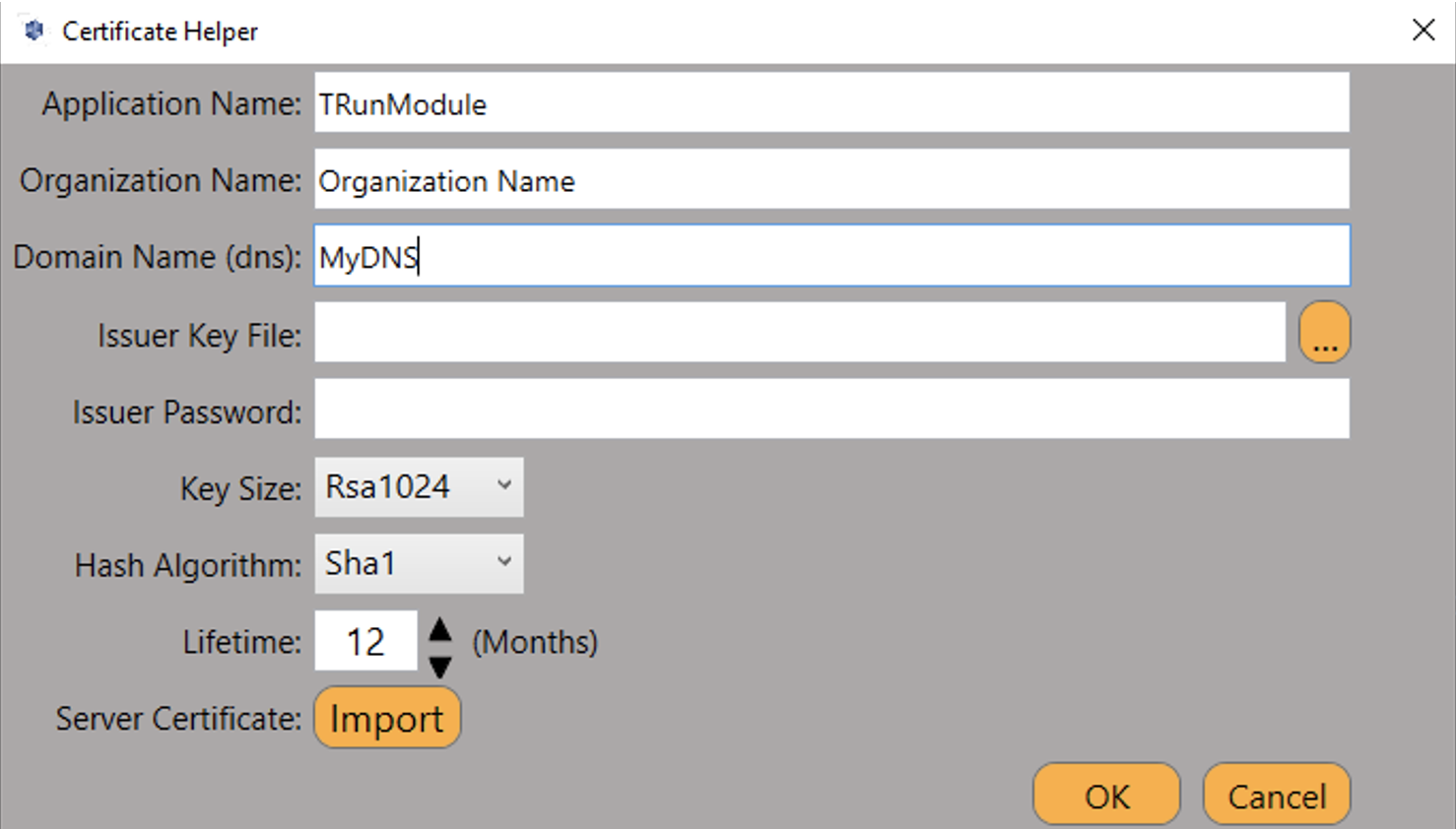
The Server certificate should be imported / trusted on the OPC Server side.
To Save
After clicking OK, save the two folders in the software platform installation folder where you can find the Certificate and the Issuer Key. They are in "C:\Users\Public\Documents\FrameworX\MachineSettings\Certificates\own\":
- "certs": In this folder will be the certificate.
- "private": In this folder will be the "Private Key", it is, a secret number that only the certificate holder knows.
The .pfx file in private folder is obligatory.
Channel Configuration
Protocol Options
ReadGroupMaxSize: Maximum number of items per OPC UA read group/subscription. Default: 100. Range: 0-10000.
Node Configuration
Station Configuration
The station parameters are:
- Service URL: Defines the location of the OPC E.g.: opc.tcp://127.0.0.1:49300
- Domain: String containing the domain for security credential.
- UserName: String containing the user name for security credential.
- Password: String containing the user password for security credential.
- Windows Authentication: Flag indicating if Windows Authentication security should be used.
- Disable Security: Flag indicating if security is disabled. (Security Policy set to None in OPC Server).
- Refresh Rate: The OPC UA Server checks for changes in the tag value at a defined interval in milliseconds. Once the change is detected, the OPC UA Client is notified and updates the corresponding value. We have this configuration because if you want faster updates, you can change it as long as the OPC UA Server supports a higher update rate. This is a refresh rate between the OPC Server and the device on the field. Default is 500ms.
- All Items Same Group: Flag indicating if the driver should add all items to the same OPC group, and only one connection is created with the OPC Server.
- Enable Read Pooling: By default, OPC uses read by exception. When this setting is enabled, Read Polling is used, and the polling interval is defined in AccessTypes.
- Read From Device: Force all reads made from device.
- Use Timestamp From Computer: Use timestamp from computer instead of device.
- Host Override: Replaces the host (and optionally the port) of the Service URL at connection time, without changing the configured URL. Host only (e.g.
10.0.0.5) keeps the original port; host:port (e.g.10.0.0.5:62541) replaces both. Leave empty to use the Service URL as-is. Useful for NAT, port-forwarding, or DNS scenarios.
You can use the Discovery button to search for the OPC Servers located in a specific IP address and port. If the port number is left empty, the utility will look for Servers on pre-defined ports (4840, 49320, 62841, 4845, 49380).
Importer Tool
You can import existing variables directly into your Project by clicking the Import Button.
With this tool, you can choose which Branch from the OPC Server namespace will be accessed and filter the variables that will be imported. The Tags and Points will be created automatically.
From FrameworX 10.1.6, Devices → Nodes shows an Import Tags link when the selected node is on an OPC UA channel. The link opens the importer already connected with the node’s server address, security and certificate settings, and creates the tags and points on the same node. See OPC UA Server Tag Importer.
Point Configuration
Address
Choose the OPC Server item that will communicate with the Project Tag. You can type the OPC Server item name into the textbox, or you can browse the OPC Server items in the Cell Editor.
For OPC Array DataTypes, you should add the Array Element of index 0 to the TagName field and set the Array field under the Modifiers column to match the array size.
For automatic address mapping when using arrays in your project and addresses in OPC Server that follows the syntax: ItemName[0 ... n], you can add the Main Array element without index in the TagName column.
TagProvider
This Communication Protocol supports the TagProvider feature, which is a tool that allows you to access your Communication Device Data Model without creating any Project Tags.
For more information, please refer to the TagProvider document.
How to Configure
To configure the OPC UA protocol as a TagProvider, go to Edit → Tags → Providers, and create a new provider for the OPCLabs protocol.
Configure the items under the PrimaryStation column the same way that was described in the Node Configuration.
Each OPC Server can have its own Branch and Attribute separator. To make sure you have the TagProvider correctly configured, make sure to have clicked the Test button at least once with a Success return message.
Troubleshoot
The status of the driver execution can be observed through the diagnostic tools, which are:
- Trace window
- Property Watch
- Module Information
Status value of 0 (zero) means communication success. Negative values indicate an internal driver error and positive values means protocol errors code.
Driver Revision History
OPC UA Revision History | |
|---|---|
Version | Notes |
1.1.0.1 | Fixes: structured (UDT) tags no longer read as zeros; date/time values keep the correct time zone; node IDs containing commas are no longer altered; read-polling values are no longer scaled twice; the backup station uses its own certificate type; certificates created from a remote Designer are found by the remote runtime; the server-trust prompt appears once per connection; tag import accepts addresses without opc.tcp://, reports clear errors and fails cleanly. Large configurations: every point receives its value after start-up and reconnection, refused points are retried, reconnections back off, and memory, CPU and handle use no longer grow over time. New: Host Override and Ignore Discovery URL station options for servers behind NAT; node passwords can use Solution Secrets; structures with opaque node IDs and arrays of structures are supported in the driver, tag import and Tag Provider; stalled subscriptions are detected, their tags marked Uncertain and the subscription rebuilt; faster browsing of large servers. The bundled OPC UA Simulator applies the selected security policies and can simulate thousands of nodes and scheduled outages. |
1.1.0.0 | Initial release on new documentation standards. |
In this section...