


When configured as a TagProvider, the MES CoreM Connector facilitates dynamic data handling from the GE Proficy Historian Database, supporting a flexible hierarchy of Plant, Area, Line, Equipment, and Variables. This setup is ideal for IoT and monitoring applications that require real-time updates and situational awareness. Since TagProviders allow for the seamless addition and modification of devices without extensive reconfiguration, this approach allows the MES CoreM Connector to dynamically integrate new devices and data sources, providing a scalable solution for applications needing continuous and flexible monitoring capabilities.
Configuration
To set up a new TagProvider connection navigate to Unified Namespace/TagProvider Connections and press the add button to open the New TagProvider Connection dialog. You can also create your TagProvider Connection directly from the AssetTree. To do this, navigate to Unified Namespace/Assets Tree and press  to open the New TagProvider Connection dialog. In the configuration dialog, select the MES CoreM Connector on the Provider field and insert the required connection parameters. After that, press the Ok button to finish the provider configuration, and it will create a folder automatically in the Assets Tree (Unified Namespace / Assets Tree).
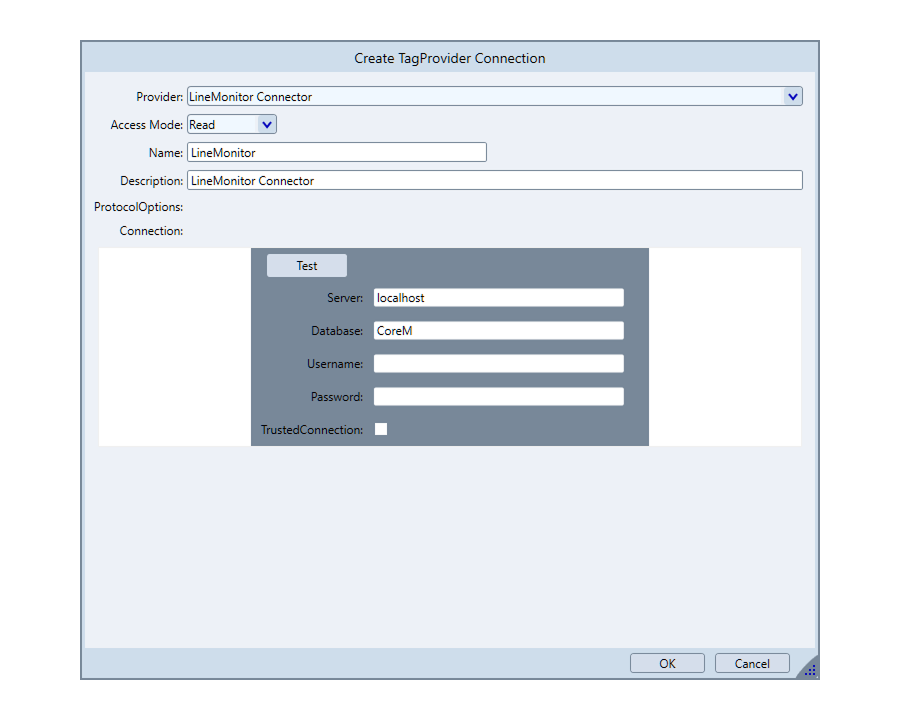
Connection Parameters
Field | Description |
|---|---|
Provider | Specifies the system the TagProvider will interface with. In this case, it interfaces with the MES CoreM Connector. |
Access Mode | Determines permissions for interacting with tags. Read allows data reading from the device. |
Name | User-defined name for the TagProvider instance. Identifies the specific configuration in the system. |
Description | Provides context for its usage. |
ProtocolOptions | Defines specific communication settings for the connection to the device. |
Connection | Defines connection settings for the MES CoreM Connector. |
In this section...